Product design case study · Themes · 5 min read

Let merchants change the colours. Not the contrast.

One cashier served every merchant on the platform, and every merchant wanted it to look like their own product. The brief was themes, plus controls letting merchants set their own colours, typography and logo. The interesting part was not the themes — it was deciding what merchants should not be allowed to change, because a merchant who picks a white button and keeps white label text has built a button nobody can read, and the support ticket arrives at us.

The problem
One cashier, two kinds of merchant, every brand wanting its own look — and a colour picker that lets a merchant build an invisible button.
The decision
Expose named surfaces rather than properties, and scales rather than values. No interaction states at all.
What I built
Seven named colour controls, typography as a scale, per-brand theming, and a contrast warning on the one pair that can still break.
The outcome
Shipped.
Product
Payments orchestration platform (anonymised)
Role
Senior UX/UI designer
Timeline
2024 – 2026
7
colour values a merchant can change, each named for what the customer sees.
The boundary
0
interaction states they can touch, deliberately.
The decision
4
fonts, then 3 sizes, 3 weights and 3 spacings — a scale, not a text field.
The constraint
2
kinds of merchant, e-commerce and gaming, each with its own themes.
The problem

01 The users

A checkout that looks like theirs, without building one

Smaller merchants embed a hosted cashier because they do not have the people to build their own checkout. What they want is for it to look like theirs — their colours, their type, their logo — without a development project to get there.

That is what theming is for. The merchant gets a branded checkout without building one.

02 The problem

Two kinds of merchant, one cashier

The platform's merchants come from two activities: e-commerce and gaming. Each wanted the deposit flow to look like the rest of their own site, and one merchant could run several brands, each needing a look of its own. What they asked for was their colour schemes and their own fonts.

So the cashier had to stay one product and look like several: separate themes for each activity, and controls each brand could set for itself.

03 The limit

What a merchant can safely be given

Give merchants a colour picker and one will eventually choose a combination that fails. I found a button whose background could be set to white while its label stayed white: a control that renders itself invisible, and does it silently.

The constraints are not about keeping the product tidy — they protect the merchant's own conversion rate, on the screen where their customers pay.

04 The decision

A scale, not a text field

Seven colours, each named for what a customer sees.
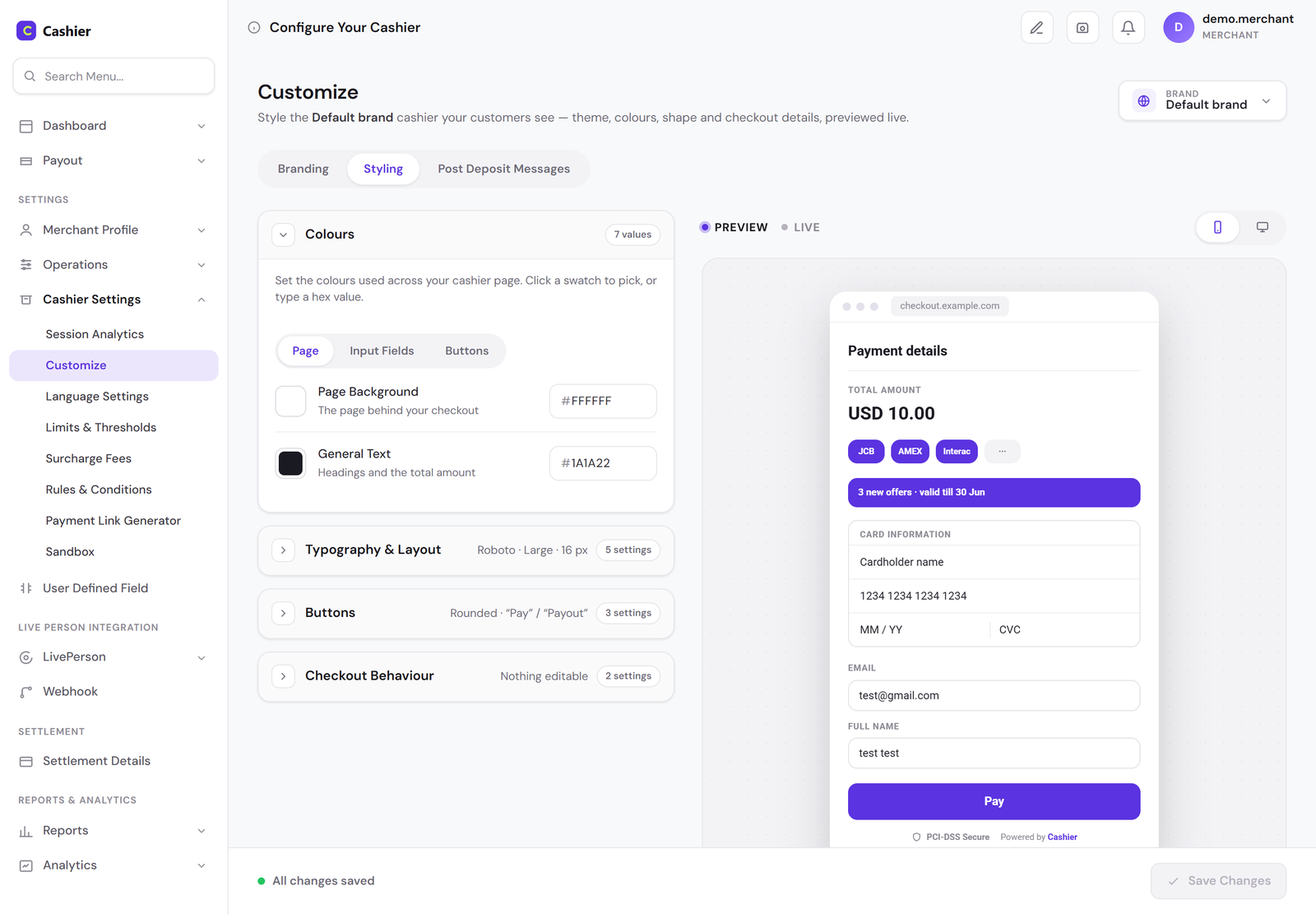
The customisation page: on the left, the Colours section open with Page Background and General Text, and collapsed sections for Typography and Layout, Buttons and Checkout Behaviour each showing a summary; on the right, a live preview of the checkout.
Fig. 01 — The controls and the result, side by side. A merchant choosing a colour is choosing what their customer sees at the moment of payment, so the preview sits next to the control rather than behind a button. View full screen

Typography is a scale. The merchants asked for their own fonts; they got four to choose from. A merchant cannot type 7px, and cannot bring their own font.
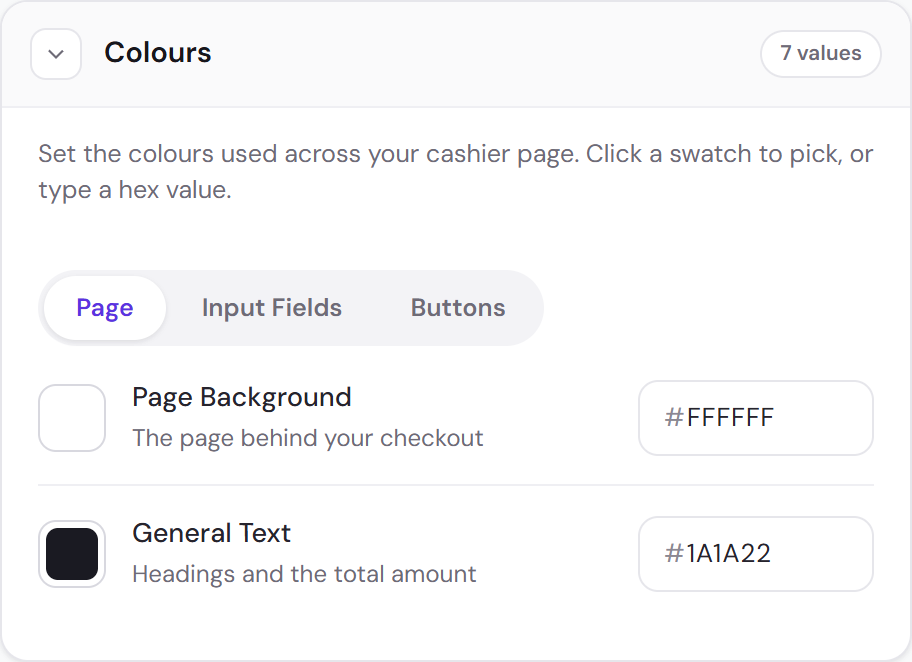
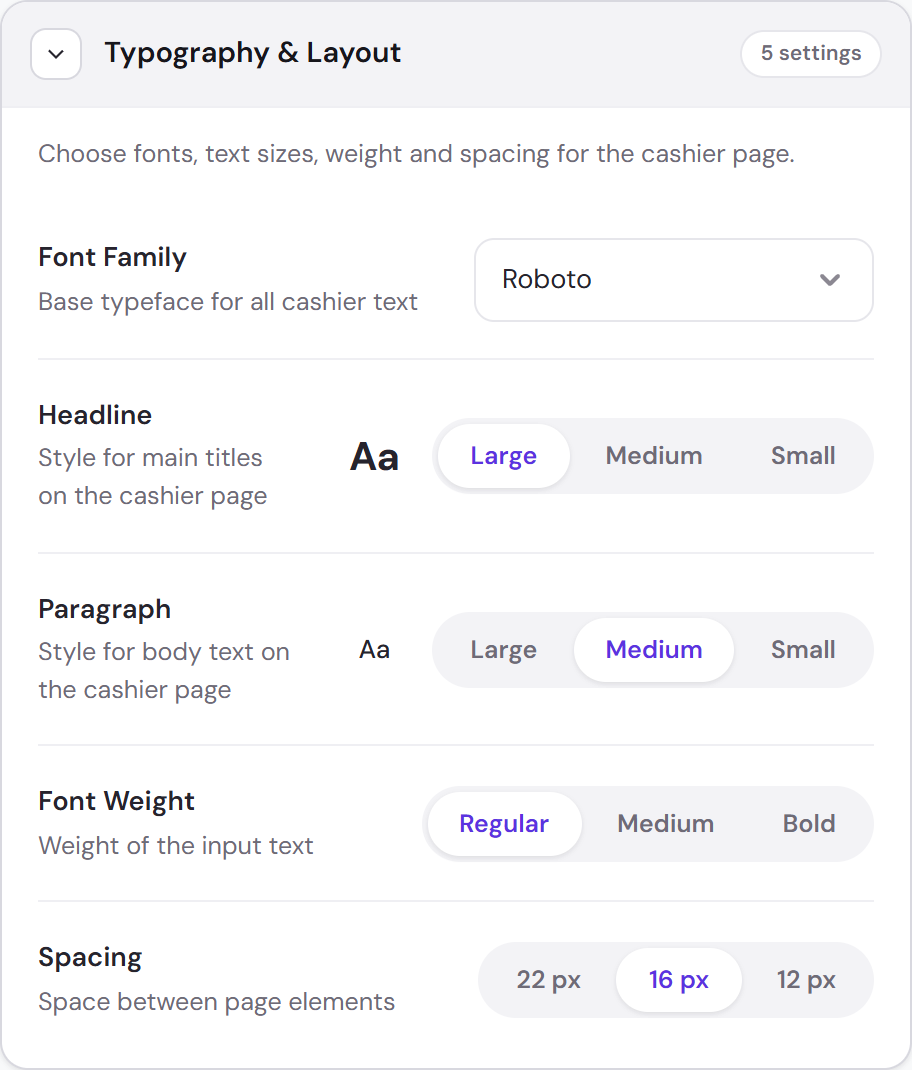
The Colours section: tabs for Page, Input Fields and Buttons; Page Background described as the page behind your checkout, and General Text as headings and the total amount, each with a swatch and a hex value. The Typography and Layout section: a font family select set to Roboto, headline and paragraph each as Large, Medium or Small, font weight as Regular, Medium or Bold, and spacing as 22, 16 or 12 pixels.
Fig. 02 — Named for what they are, chosen rather than typed. “Page background — the page behind your checkout” needs no design vocabulary to set, and a size picked from three cannot be one the layout was never built for. View full screen: colours · typography

No interaction states at all. A merchant knows what their brand looks like. They do not know what an error state has to do. Hover, focus and error are derived, not configured.

Every section says what it is currently set to — “0 of 2 set” on the logo and favicon, “Roboto · Large · 16 px” on typography, “Nothing editable” on checkout behaviour — so a merchant can read the whole configuration without opening a single section.
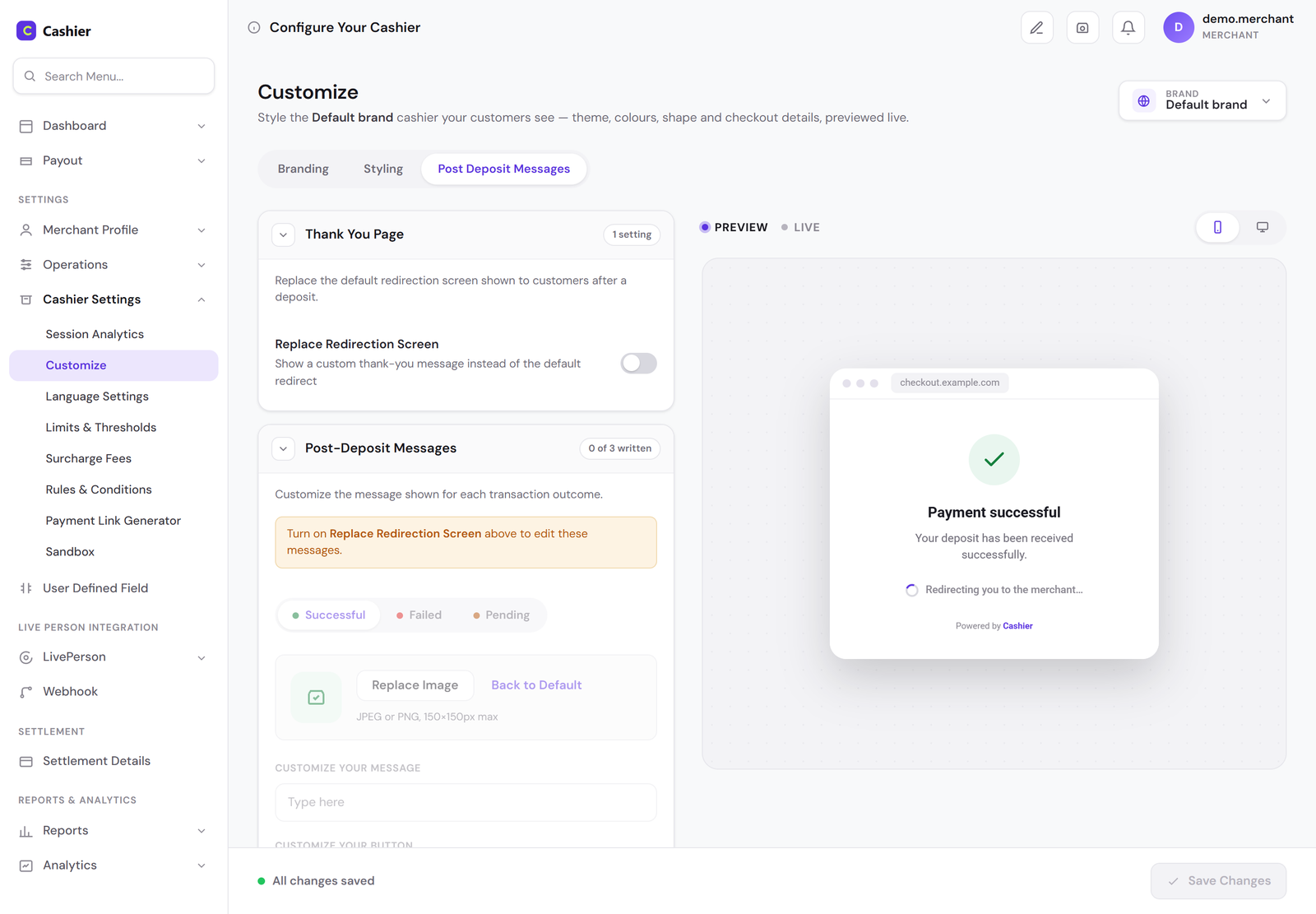
The Post Deposit Messages tab: the Thank You Page section with a Replace Redirection Screen switch turned off, and below it the Post-Deposit Messages section carrying a notice: turn on Replace Redirection Screen above to edit these messages.
Fig. 03 — Locked, and saying why. A disabled section with no explanation reads as broken; one that names the switch that opens it reads as a rule. View full screen

One pair still needed a guard. Button text and button background are both editable and sit in the same group, so the white-on-white case can still be built. The shipped product warns the merchant when that pair fails contrast, rather than taking the choice away.

05 Where it got hard

The stepper on a phone

The checkout step counter sits in the header. Styling applied to the desktop header carries to mobile, where the header is also where the steps live — so a merchant choosing a white step counter and a blue header makes the steps invisible on the device most customers pay from.

I rejected moving the counter inline with the logo for two reasons: the steps are tap targets and the space does not allow a comfortable one, and a horizontal logo — the kind plenty of merchants have — leaves no room beside it at all. On a phone the steps get a row of their own, under the logo.
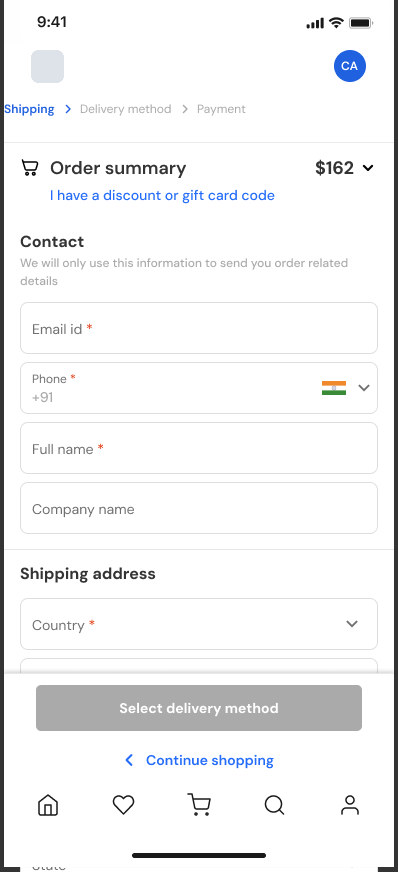
The e-commerce checkout on a phone: the logo and an avatar on the top row, the steps Shipping, Delivery method and Payment on a row of their own beneath, then a collapsed order summary and the contact form.
Fig. 04 — The steps on a row of their own, out of the header a merchant styles, with room for tap targets and for a wide logo. Logo anonymised. View full screen

06 The themes

Two activities, separate themes

Gaming and e-commerce customers expect different checkouts. A deposit is not a purchase: there is no cart, no shipping, no delivery method. So each activity was offered its own themes, and I designed the e-commerce one — desktop and mobile, for new, returning and guest customers.
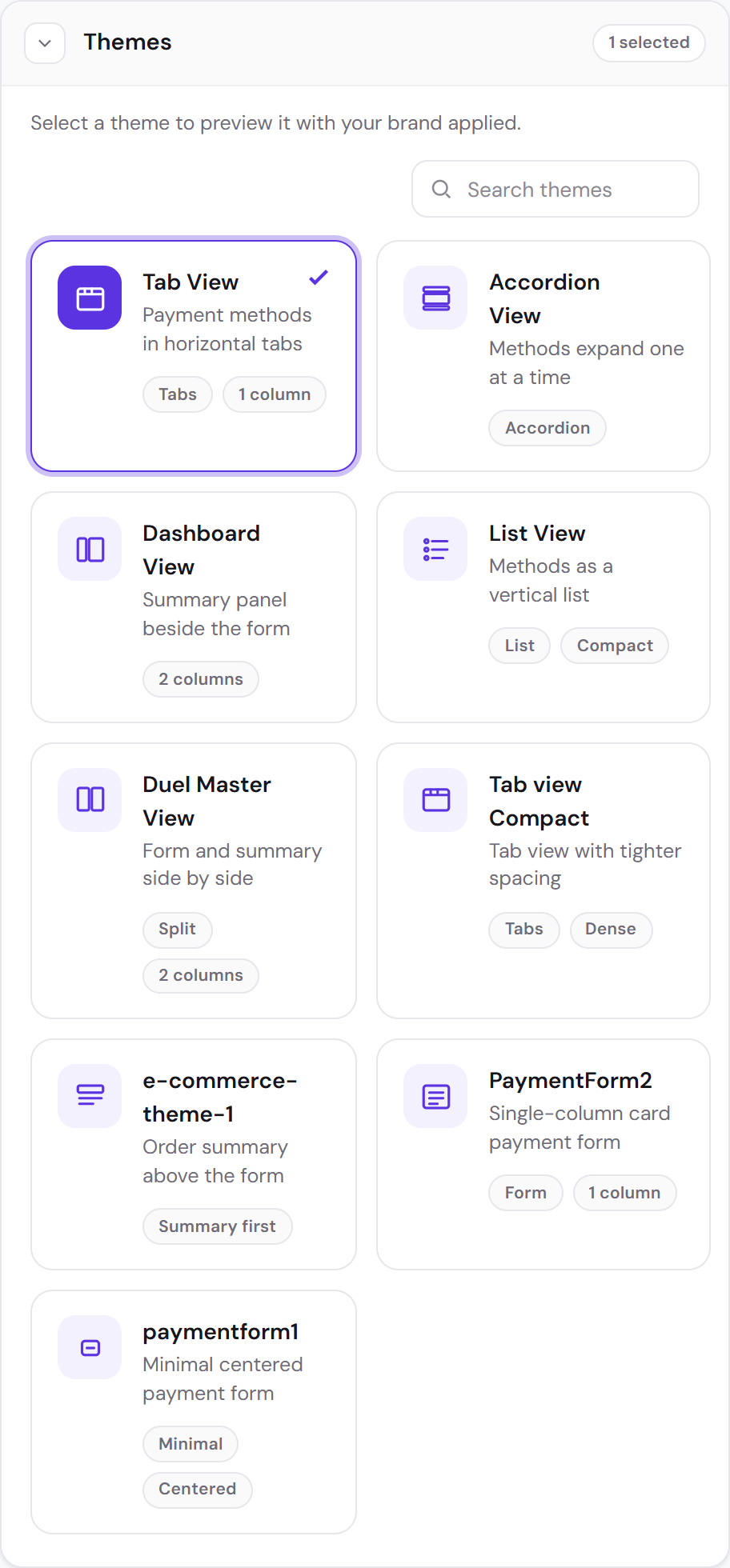
The Themes section: a search field and nine theme cards, each with a name, a one-line description and tags such as Tabs, Accordion, 2 columns or Summary first.
Fig. 05 — A merchant picks a layout here and sees it previewed with their own brand applied, so choosing a theme never means imagining it. View full screen
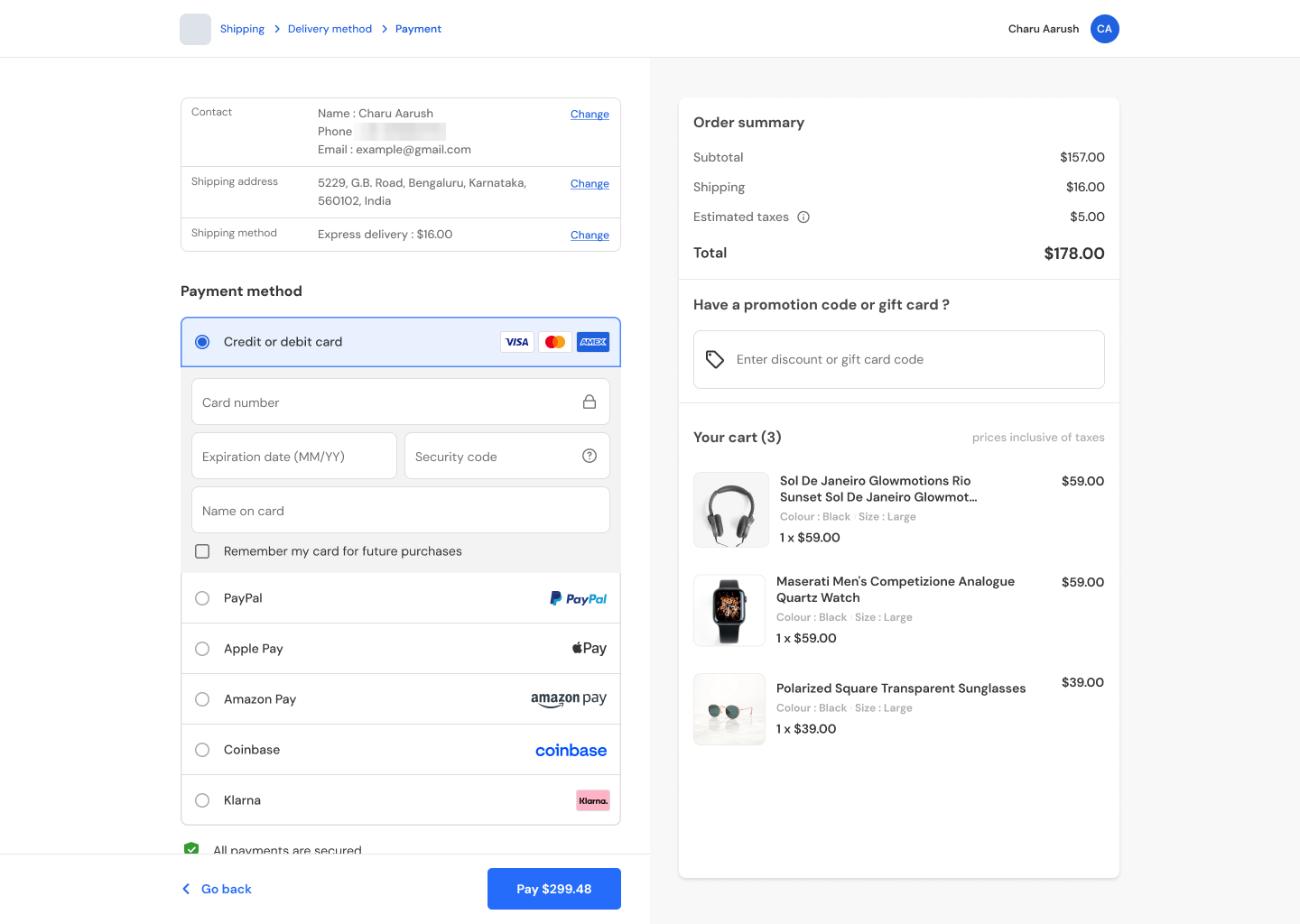
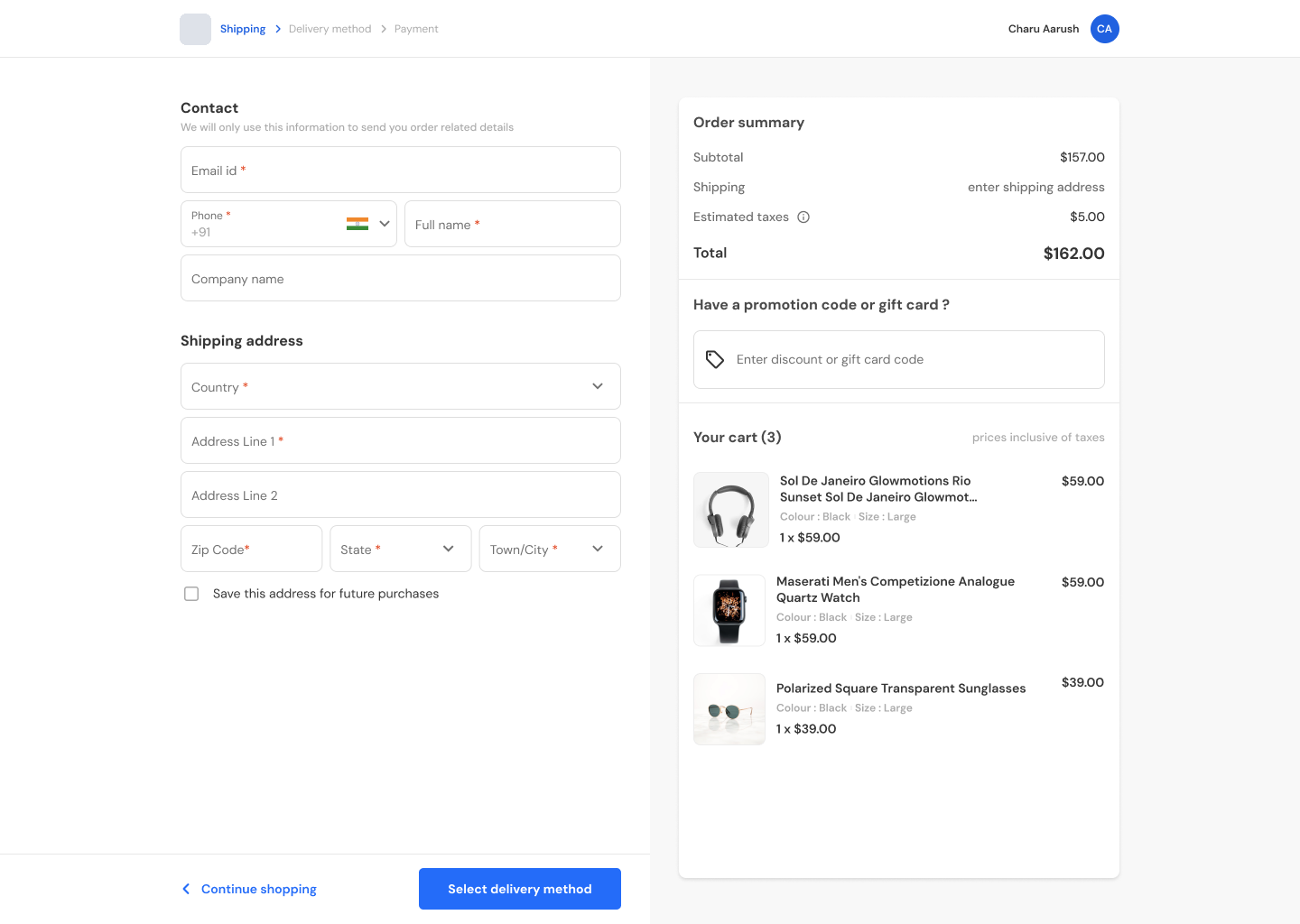
The e-commerce theme on desktop, shipping step: contact and shipping address on the left; on the right the order summary with subtotal, shipping, taxes and total, a promotion code field and the cart. The e-commerce theme on desktop, payment step: a summary of contact, address and shipping method with Change links, then payment methods — card, PayPal, Apple Pay, Amazon Pay, Coinbase and Klarna — beside the same order summary.
Fig. 06 — A shopper's checkout, not a gaming deposit: contact, shipping, delivery and payment in that order, with the order summary and cart beside every step. Logo, names and contact details anonymised. View full screen: shipping · payment

07 Where it stands

Shipped, for both activities

The themes and the customisation controls have shipped, with no serious disagreement and no reversal along the way.

I think that is because the limits came first. Seven named colours, a type scale and no interaction states were decided before the controls were drawn, so the arguments a customisation page usually produces — whether a merchant can set this, at what size, in which state — were settled in the design rather than discovered in the build.

08 Reflection

What I learned

  1. Customisation is a safety question before it's a brand one

    Deciding what could not change came first; the brand was built from what was left.

  2. Name a control for what the customer sees

    “Input field border” needs no help text.

  3. A setting reaches further than the screen it was designed on

    Every customisation has to be checked on every breakpoint it reaches, not only the one it was drawn for.
Next case study · 5 min read I designed the page. Then I taught two teams to build it without me. Piloting a new internal page-building tool on Hispanic Heritage Month, then handing the workflow to the teams who run event pages.